https通过nginx完成双向认证转发
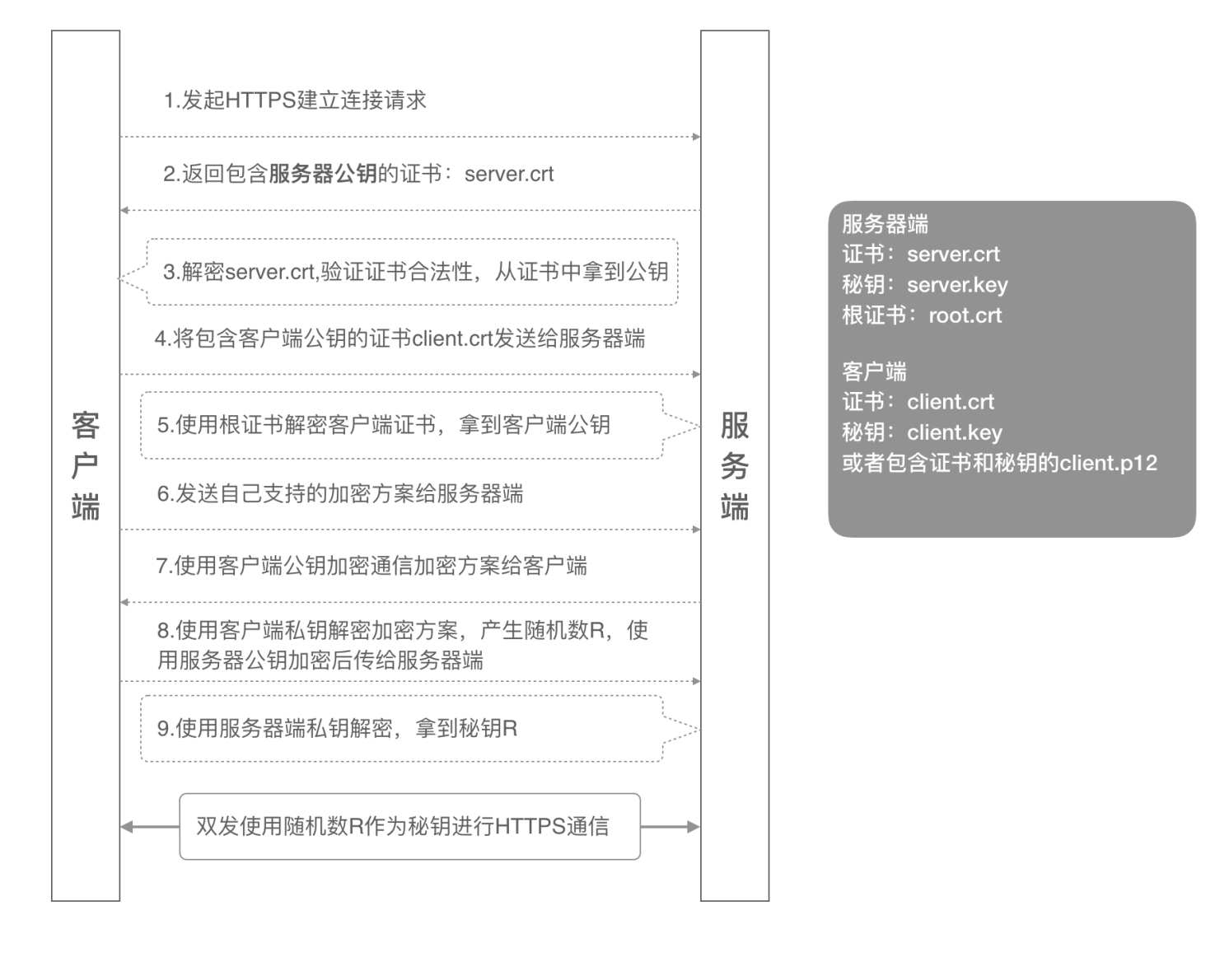
https 的双向认证
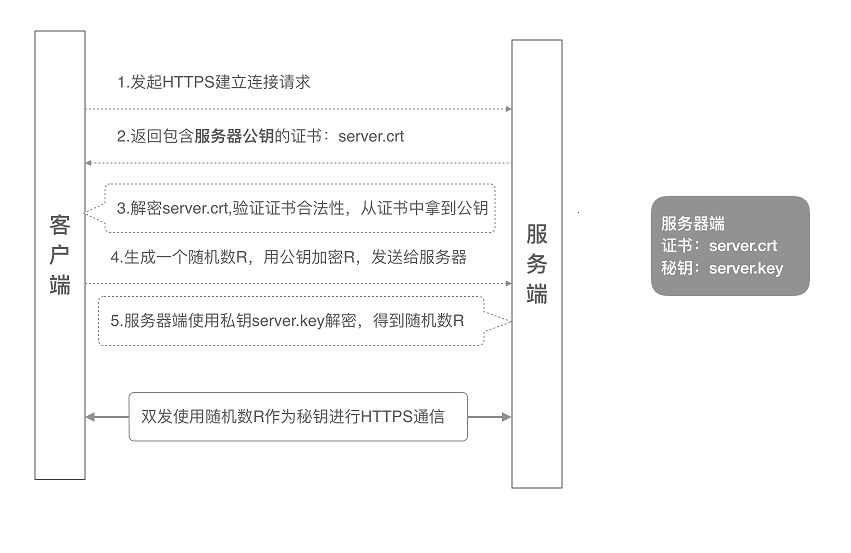
单向认证
双向认证
总结
- 单向认证客户端会验证服务端的合法性,双向认证两者都会验证对方的合法性
- 单向认证服务端需要配置证书,双向认证两者都要配置对应的证书
证书
生成自签证书
# 生成CA私钥,会让你输自定义密码(例:000000)
openssl genrsa -aes256 -out ca.key 2048

# 制作CA公钥/根证书
openssl req -new -x509 -days 3650 -key ca.key -out ca.crt
# 输入CA密码:000000
# Common Name 随意填写(test.com);其它随意
利用 CA 证书签发服务端证书
# 生成服务器私钥(.pem文件),会让你输自定义密码(例:111111)
openssl genrsa -aes256 -out server.pem 1024
# .pem文件转换.key文件
openssl rsa -in server.pem -out server.key
# 输入Server密码:111111

# 生成签发请求
openssl req -new -key server.pem -out server.csr
# 输入Server密码:111111
# Common Name填写自己的ip地址即可,其他随意

# 用CA签发证书
openssl x509 -req -sha256 -in server.csr -CA ca.crt -CAkey ca.key -CAcreateserial -days 3650 -out server.crt
# 输入CA密码:000000
利用 CA 证书签发客户端证书
# 生成客户端私钥(.pem文件),会让你输自定义密码(例:222222)
openssl genrsa -aes256 -out client.pem 1024
# .pem文件转换.key文件
openssl rsa -in client.pem -out client.key
# 222222

# 生成签发请求
openssl req -new -key client.pem -out client.csr
# 输入Client密码:222222
# Common Name填写自己的ip地址即可,其他随意

# 用CA签发证书
openssl x509 -req -sha256 -in client.csr -CA ca.crt -CAkey ca.key -CAcreateserial -days 3650 -out client.crt
# 输入CA密码:000000

# 使用浏览器访问时,需要生成p12格式的客户端证书,会让你输入自定义密码(例:123456)
openssl pkcs12 -export -clcerts -in client.crt -inkey client.key -out client.p12
服务端使用 https 进行通信,并使用双向认证
const express = require("express");
const https = require("https");
const fs = require("fs");
const app = express();
const PORT = 7000;
const options = {
  key: fs.readFileSync("./ssl/server.key"),
  cert: fs.readFileSync("./ssl/server.crt"),
  ca: [fs.readFileSync("./ssl/ca.crt")],
  requestCert: true,
  rejectUnauthorized: true,
};

https
  .createServer(options, app)
  .listen(PORT, () => console.log(`App listening on port ${PORT}!`));

app.get("/v1", (req, res) => res.send("Hello World!"));
配置 Nginx,进行请求转发
当我请求 http://localhost:8080/api 时,Nginx 会转发到 https://localhost:7000/v1,并携带上客户端证书、私钥和密码
server {
    listen       8080;
    server_name  localhost;

    location /api {
        proxy_ssl_certificate ssl/client.crt;
        proxy_ssl_certificate_key ssl/client.key;
        # client-pw.txt 里面是Client密码:222222
        proxy_ssl_password_file ssl/client-pw.txt;
        proxy_pass https://localhost:7000/v1;

    }
    error_page   500 502 503 504  /50x.html;
    location = /50x.html {
        root   html;
    }
}
测试
直接使用浏览器访问
https://loalhost:7000/v1是获取不到数据的使用
http://loalhost:8080/api是可以获取到数据的或者浏览器安装 client.p12 证书(安装时输入的密码是 p12 密码:123456)也是可以通过
https://loalhost:7000/v1获取到数据